
Bible Presentation Software: What to Look For
How to choose Bible presentation software for your church: finding verses fast, translations, lyrics, the stream, offline use and the real cost.
· 5 min read · The RheoCast team
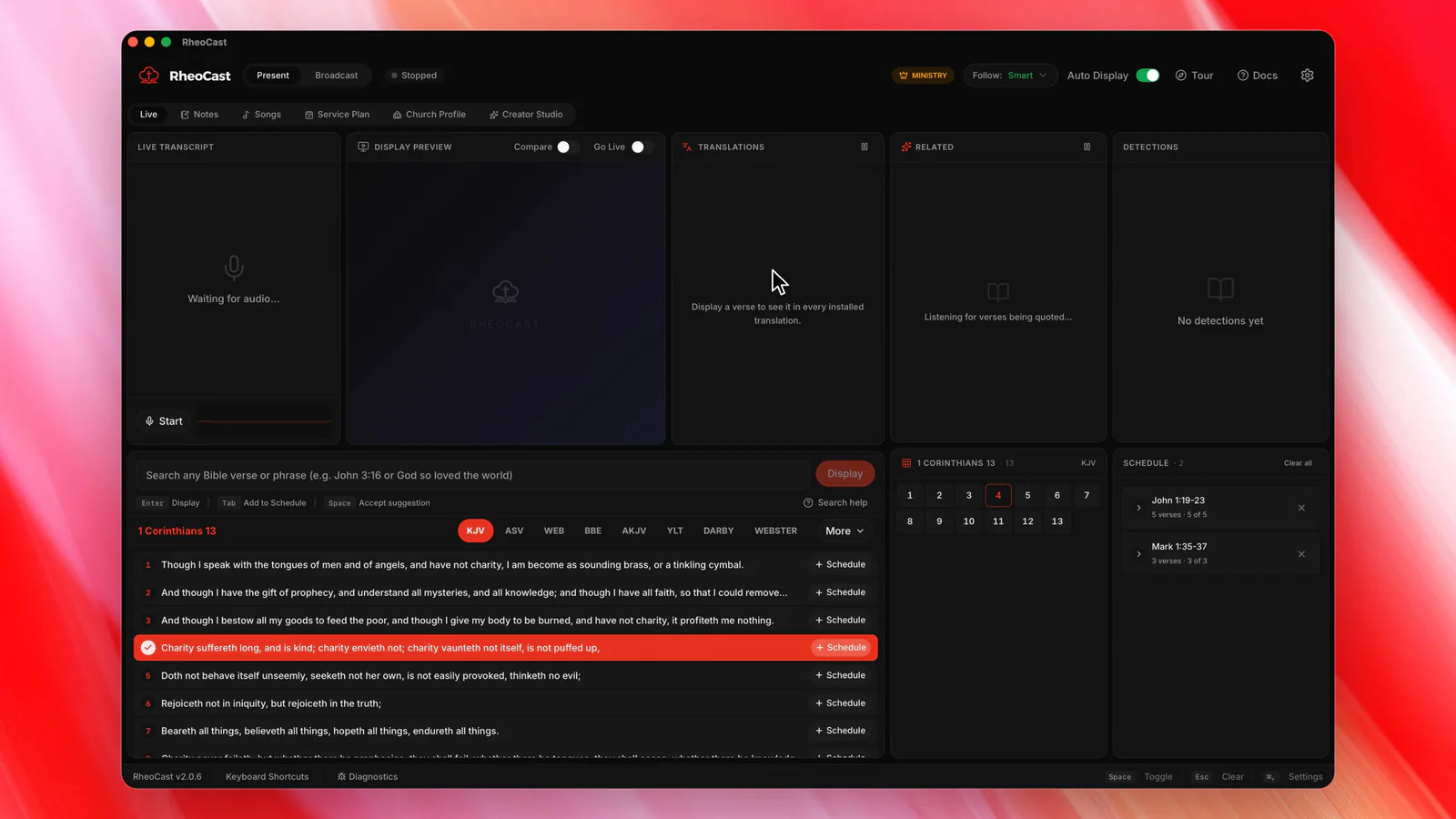
In most churches the Bible verse on the screen is the one piece of presentation that has to be right every time. The congregation reads along, people at home follow on the stream, and when the verse is late or wrong, everyone notices. Bible presentation software exists to make that easy for whoever is at the computer, who is very often a volunteer.
There are many programs to choose from, from free and simple to expensive and powerful. This guide covers the questions that matter when you choose one, so you can judge any of them, ours included.
1. How fast can you get a verse on the screen?
The preacher says "Turn with me to Romans 8 verse 28", and the clock starts. Look for:
- Search that understands how people type.
Romans 8:28androm 8 28should both work, and so should a few words of the verse when nobody can remember the reference: "God so loved the world". - One key to show it. Typing the reference and pressing Enter should put it up. Every extra click is a second the congregation waits.
- A way to look without showing. Sometimes the operator needs to check a verse before it goes up. RheoCast's Search privately opens a window of its own for that, while the main screen stays as it is.
- A schedule. If the readings are known in advance, line them up before the service and present each with one click.
2. Can it keep up with the preacher?
Typing references is fine when a sermon has three readings. Many sermons have twenty, quoted quickly, some of them only by a few words. This is where newer software differs most from older programs.
Automatic scripture detection listens to the sermon and puts the verse on the screen when the preacher says it. RheoCast does this, and spoken commands like "next verse" or "go back" move the screen. On its Pro and Ministry plans it goes further: when the preacher announces a passage and reads through it, the next verse goes up as the reading reaches it. Read Automatic Scripture Detection for Church Services for what to expect from it on a Sunday.
Even with detection, the operator stays in charge. A good program lets you choose whether verses go up by themselves or wait for a click.
3. Which translations can you use?
This question catches many churches out.
- Public-domain translations such as the KJV, ASV and WEB can be included in any software for free. RheoCast includes eight, and they work with no internet connection.
- Modern translations such as the NIV, NKJV, NLT and ESV are under copyright. Showing them needs permission from the publisher, so check how a program offers them and what it costs.
- Your own language. If your congregation reads a Bible in Twi, Yoruba, Swahili or another language, check whether you can import it. RheoCast imports Bibles from common file formats (on paid plans), keeps them on your computer only, and switches to one when the preacher names it.
- Two at once. Some churches like to show a second translation beside the first. Look for a side-by-side or stacked view.
4. Is the verse easy to read?
A verse that is too long for the screen, set in thin type on a busy background, defeats the purpose. Check that the software fits long verses without shrinking them to nothing, lets you set the font, colors and background to suit your room, and shows the reference clearly. RheoCast also lets the operator highlight a phrase on the screen as it is preached, so the congregation follows the verse phrase by phrase.
5. Does the verse reach the live stream?
If your church streams, the people at home need the verse too. With many setups, the presentation program and the streaming program are separate, and someone has to connect them and keep them in step.
Ask whether the software can put the verse on the stream itself, as a full-screen slide or along the bottom of the camera shot. In RheoCast, the verse on the church screen and the verse on the stream are the same verse, at the same moment, because the presentation and the broadcast are one app.
6. What happens when the internet drops?
Sunday internet fails at the worst time. Your scripture, translations and lyrics should keep working with no connection at all. Ask what stops when the connection drops, and what keeps going. In RheoCast, search, the eight built-in translations, lyrics, notes and the whole Broadcast console work offline. Live transcription needs a connection, except on Pro and Ministry computers set up to transcribe offline.
7. What else does it do?
A church service is more than scripture. Most churches also need song lyrics, sermon notes, announcement slides and video. Running all of them from one program means one thing to learn and one screen to manage. RheoCast has its own slide editor, shows a PowerPoint as it is or lets you edit a copy, and shows PDFs page by page, all on the free plan. See Showing Worship Lyrics on Screen and on the Stream.
8. What does it really cost?
Look past the headline price:
- Is it a subscription or a one-off licence, and does a one-off licence need paying again for updates?
- How many computers can use it?
- Are the translations you want extra?
- Is streaming included, or a separate program?
- Does the free version end, or add a watermark to what your viewers see?
A quick checklist
| Question | Why it matters |
|---|---|
| Can I search by reference and by words? | Speed when the preacher turns quickly |
| Can it follow the sermon by itself? | One volunteer, many verses |
| Which translations, and in my language? | What your congregation actually reads |
| Does the verse reach the stream? | People at home read along too |
| Does it work offline? | Sunday internet is not guaranteed |
| Lyrics, notes and slides as well? | One program to learn |
| What is the total cost? | Translations, computers, streaming |
Where to go next
For a side-by-side look at the main options, including RheoCast, ProPresenter, EasyWorship, Pewbeam and Loghema, read The Best Church Presentation Software in 2026, Compared. Or download RheoCast and try it with next Sunday's readings: search, the built-in translations, lyrics and streaming are free.
Read next
- Automatic Scripture Detection for Church ServicesSoftware that hears the preacher say a verse and puts it on screen. What it does on a Sunday, what to expect from it, and how to set it up well.
- The Best Church Presentation Software in 2026, ComparedRheoCast, ProPresenter, EasyWorship, Pewbeam, Loghema, OBS and the free options, compared on scripture, lyrics, streaming, platforms and price.
- Showing Worship Lyrics on Screen and on the StreamHow to put worship song lyrics on the church screen and the live stream: preparing songs, slides people can read, and following the worship leader.