
Free Church Presentation and Streaming Software
What a church can do for free: put verses and lyrics on screen, run cameras and scenes, and stream to YouTube and Facebook without a watermark.
· 5 min read · The RheoCast team
Church budgets are tight, and software subscriptions add up quickly: one program for the words on the screen, another for the stream, another for graphics. Many smaller churches end up with a patchwork of free tools that do not talk to each other, run by a volunteer who is doing three jobs at once.
This post sets out what a church can do today without paying anything, what the usual free options are, and where paying starts to make sense.
What a church actually needs on a Sunday
Before comparing software, it helps to list the jobs:
- Scripture on the church screen when the preacher reads it.
- Song lyrics on the screen during worship.
- Slides and media: announcements, sermon points, a video.
- The live stream: cameras, switching between them, and getting the service to YouTube or Facebook.
- Graphics on the stream: the preacher's name, the verse, the lyrics, along the bottom of the picture.
The classic free setup splits these between a presentation program (jobs 1 to 3) and OBS Studio for streaming (jobs 4 and 5). OBS is excellent, free and open source, and many churches stream with it every week. The difficulty is that the two programs do not know about each other. When the preacher turns to Romans 8, someone types it into the presentation program for the room, and the stream only shows it if the two were connected with a capture or a browser source and that connection is still working.
What RheoCast's free plan includes
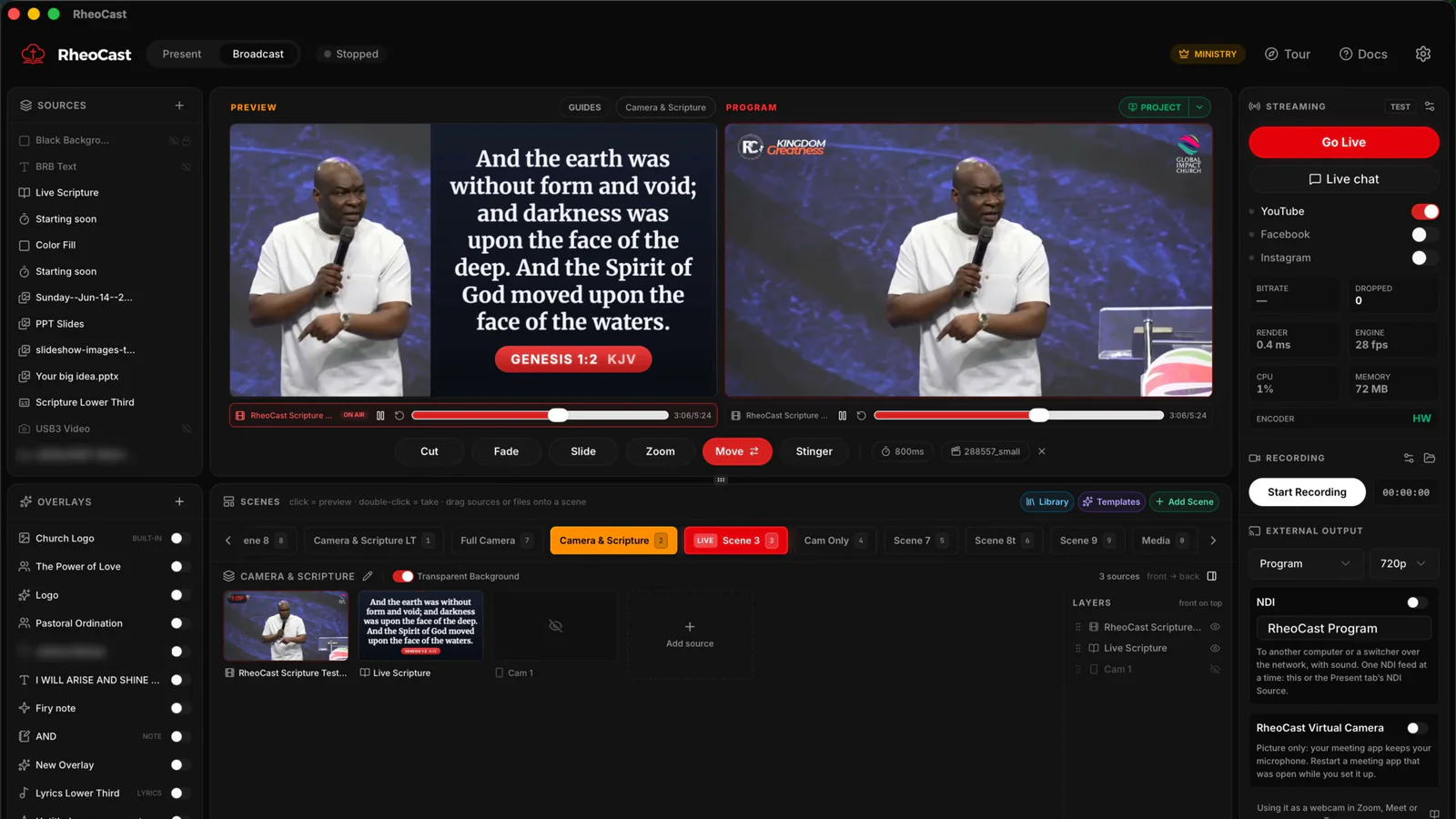
RheoCast does all five jobs in one app, and the free plan is not a short trial of it. It includes:
- The whole Broadcast console: scenes, transitions, overlays and an audio mixer, with recording and streaming to YouTube and Facebook at the same time. Your stream and your recordings carry no watermark, on any plan.
- Phones as extra cameras, with the free RheoCast Camera app. No camera to buy.
- Slides, PowerPoint and PDFs: make slides in RheoCast's own editor, show a PowerPoint or edit a copy of it, and show a PDF page by page, zooming in on air.
- Lower thirds and graphics: names and roles in 26 styles, the verse and the lyrics along the bottom of the picture, announcements, tickers, countdowns and title cards, or your own designs.
- A screen for the preacher and a remote in your pocket: a countdown on a screen only the preacher sees, and scripture, songs, scenes and timers from a phone.
- Song lyrics, including an import of your existing EasyWorship library and of song files from SongSelect, so nobody retypes a song.
- Your own sermon notes: type or paste them, and show them a page at a time on the church screen and the stream, or put one sentence on the stream as a lower third.
- Service plans: plan Sunday's songs, readings and announcements ahead, and load the service with one click.
- Scripture search with eight Bible translations built in (KJV, ASV, WEB, BBE, AKJV, YLT, Darby and Webster). They work with no internet connection.
- A 14-day trial of automatic verse detection, with 45 minutes of transcription, so you can see the verse go up the moment it is read before deciding whether you want it every week.
The free plan's church-screen display carries a faint RheoCast watermark after the trial, and paid plans remove it. The Broadcast output, which is what your online viewers see, never has one.
Why we made Broadcast free
OBS is free, and we want churches that stream with it to be able to move to RheoCast without paying for the privilege. So the Broadcast console, everything OBS does for a church plus scripture, lyrics and graphics built in, is free on every plan. If you are mid-way through a move from OBS or vMix, RheoCast can also feed your existing switcher over NDI while you change over, on every plan.
Other free options worth knowing
- OBS Studio: free streaming and recording, very flexible, with a learning curve. Scripture and lyrics come from a separate program.
- OpenLP: a free, open-source presentation program for lyrics, scripture and slides. It puts words on the church screen; the streaming is done elsewhere.
- FreeShow: free and open source, for lyrics, scripture and slides. In 2026 it added streaming and, as an opt-in feature, scripture from voice input, though its own guide still recommends OBS for live streaming.
- Free tiers and trials of paid programs: useful for a test, but check whether a trial ends, adds a watermark, or leaves out the parts you need on a Sunday.
For a side-by-side look at the paid options as well, read The Best Church Presentation Software in 2026, Compared.
When paying makes sense
The free plan covers putting things on screen and streaming them. What you pay for in RheoCast is the part that saves a volunteer the most work: live transcription and automatic verse detection. RheoCast listens to the sermon and puts each verse on the screen, and the stream, the moment it is read. On Pro and Ministry it also follows the reading verse by verse.
Paid plans also add Creator Studio, which turns each sermon into notes, a summary and more; your own imported Bible translations; full control of the display's fonts, colors and effects; and, on Pro and Ministry, Follow Reading, offline transcription on capable computers, and the Present tab's own outputs for other switchers. Prices are shown in your own currency on the pricing page. In the United States, Starter is $8 a month, Pro is $18 and Ministry is $36.
If your church is on a ChurchCast plan with its own app (Basic Plus and above), RheoCast also publishes the devotional series written from Sunday's sermon straight to that app (RheoCast Pro and Ministry, or ChurchCast Professional Plus and Enterprise), and ChurchCast's Professional plans and above include RheoCast.
Getting started
- Download RheoCast for macOS or Windows and create a free account.
- Import your songs from EasyWorship or from song files.
- Add your cameras in Broadcast, including a phone or two.
- Add your YouTube and Facebook stream keys, build a few scenes, and test.
If your church is new to streaming, How to Stream Your Church Service to YouTube and Facebook covers sound, cameras and internet speed, step by step.
Read next
- How to Stream Your Church Service to YouTube and FacebookA practical guide to streaming your church service: cameras, sound, internet, going live on YouTube and Facebook together, and a checklist.
- The Best Church Presentation Software in 2026, ComparedRheoCast, ProPresenter, EasyWorship, Pewbeam, Loghema, OBS and the free options, compared on scripture, lyrics, streaming, platforms and price.
- How to Use a Phone as a Church CameraTurn an iPhone or Android phone into a camera for your church stream: over Wi-Fi, by USB cable, or through HDMI and a capture card.