
RheoCast vs Pewbeam vs Loghema: Scripture Apps Compared
Three apps that listen to the sermon and put the verse on screen. What each one does, what it costs, and what RheoCast adds on top.
· 10 min read · The RheoCast team
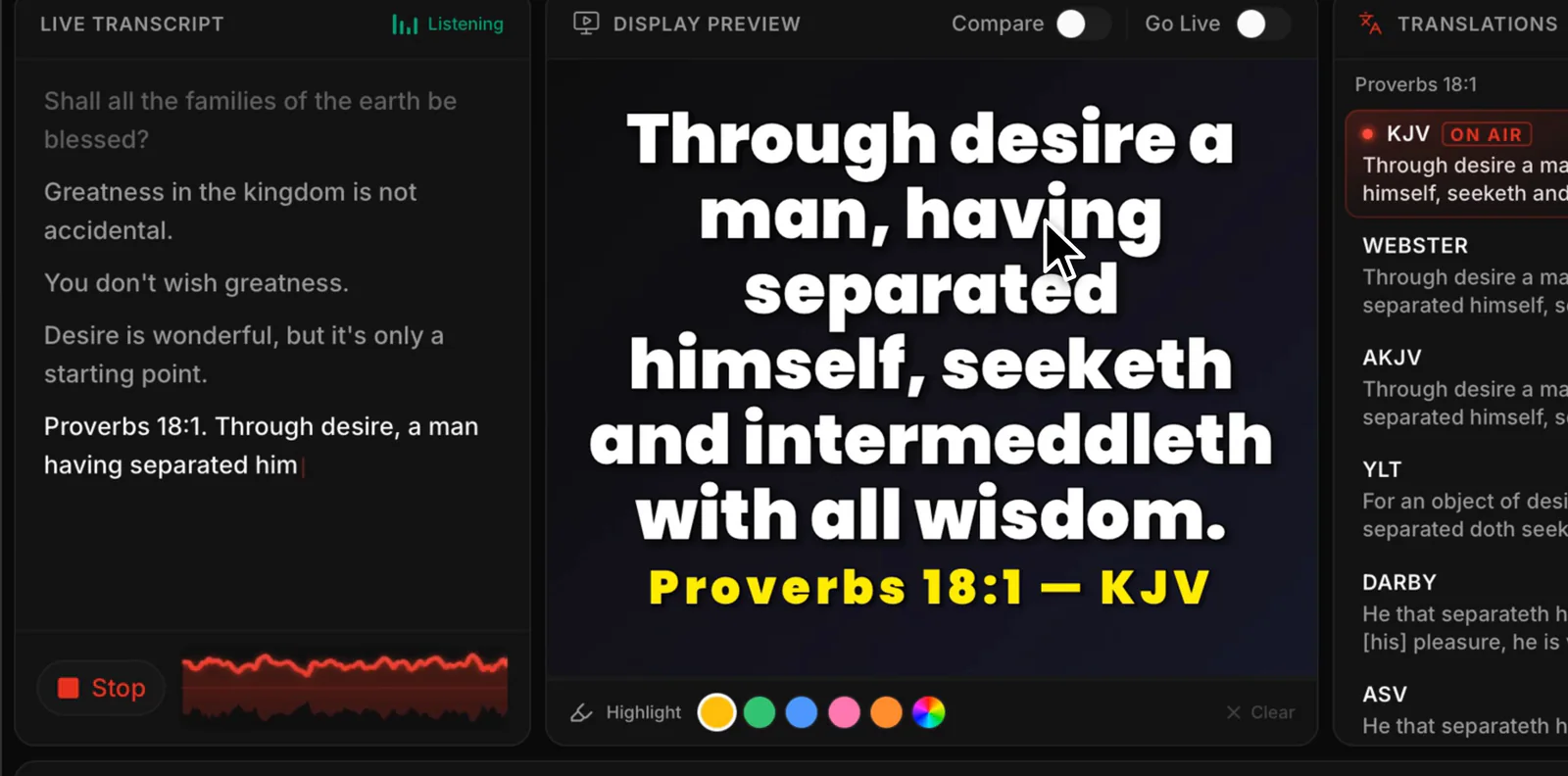
A few years ago, putting the verse on screen the moment it was read was something only a quick volunteer could do. Today several apps listen to the sermon and do it for you. Two of them, Pewbeam and Loghema (formerly LogosAI), are used widely by churches in Africa and beyond. RheoCast, the newest of the three, does it too.
All three detect scripture as it is spoken. Where they differ is in everything around that: how far each one follows the sermon, whether it works without the internet, and whether it can run your live stream or only feed another program that does.
We make RheoCast, so read this with that in mind. Every fact about Pewbeam and Loghema below comes from their own websites, checked on November 26, 2026, and from our own testing. Software changes quickly, so check their sites for anything that matters to your decision.
At a glance
| RheoCast | Pewbeam | Loghema | |
|---|---|---|---|
| Computers | macOS, Windows | macOS, Windows | macOS, Windows |
| Verse on screen from speech | Yes | Yes | Yes |
| Transcribes offline | Pro and Ministry, on computers that pass a short test (Apple silicon Macs and Windows PCs with a dedicated graphics card can qualify), English | Paid plans | Apple silicon Macs only, English, as an optional download |
| Streams to YouTube and Facebook itself | Yes, to several at once, every plan | No: sends its output to OBS or similar | No: sends its output over HDMI or NDI to OBS or similar |
| Cameras, scenes and recording | Yes, every plan | Not on its site | Not on its site |
| Phone as a camera | Free iOS and Android app | Not on its site | Not on its site |
| Song lyrics | Every plan: import an EasyWorship library, SongSelect and ChordPro files; on the church screen and the stream | Lyrics from PowerPoint, Word and PDF files; lyrics that follow the singers by listening (paid plans) | Lyrics tools |
| Sermon notes, slides, PowerPoint and PDFs | Every plan: your own sermon notes, a page at a time, or a sentence as a lower third on the stream; make slides in RheoCast, edit a copy of a PowerPoint, show a PDF page by page and zoom into any part of it on air | AI slides from sermon notes | Sermon points on screen (Starter and above) |
| Lower thirds and graphics on the stream | Every plan: names and roles (26 styles, ten with a photo or your logo), verses, lyrics, announcements and tickers, countdowns, title cards, your social handles, or your own designs | Lower thirds and livestream graphics | Not on its site |
| A countdown screen for the preacher | Every plan: countdowns, and a third screen only the preacher sees, with a timer that turns amber, then red, as time runs out | No stage display on its site | No stage display on its site |
| Run it from a phone | Every plan: a web remote for scripture, songs, scenes, audio and timers, with nothing to install | Not on its site (OSC and HTTP control) | "Control Loghema from your phone" |
| Bible translations | 8 built in, offline | 20 on paid plans (4 on the free plan), including the NIV, ESV and NKJV | "150+" |
| Import your own Bible | Yes, on paid plans: from common Bible file formats, a Bible in your own language included, kept on your computer | Not on its site (the translations it provides) | Not on its site (the translations it provides) |
| After the service | Creator Studio: transcript, summary and notes (Starter and above), devotionals (Pro and Ministry) | Content Studio: notes, newsletters, tracts, devotionals; the Pewnote app | Sermon notes (Starter and above) |
| Social media posts | Yes, on Ministry (and ChurchCast Enterprise): key takeaways, a quote, a thread or carousel, a recap. From Pro, each devotional day also saves as a picture to share | Not on its site | Not on its site |
| Your church's app | With ChurchCast (Basic Plus and above): Sunday's devotionals go straight to the church's own app, on RheoCast Pro and Ministry or ChurchCast Professional Plus and Enterprise; from ChurchCast Professional, services planned there load into RheoCast | Its own Pewnote app for members (Core plan) | Not on its site |
| Free plan | Yes: songs, your own sermon notes, service plans, slides and the whole Broadcast console, with verse detection as a 14-day trial with 45 minutes of transcription; after it, a watermark on the church screen | Yes: 60 transcription minutes in total, a watermark on its displays | Yes: one hour of transcription, no watermark |
| Paid plans | $8, $18 or $36 a month in the US | $144 or $300 a year | ₦9,999 to ₦37,000 a month (from $14 a month in US dollars) |
Detecting the verse
All three listen to the preacher and recognise references as they are said. Each lets the operator see what was detected and choose what goes on screen.
- Pewbeam puts direct references on screen by itself, and holds verses it matched from a paraphrase in a "Recent detections" panel for the operator to choose.
- Loghema says it detects direct citations, quotes and paraphrases, and lets you set how sure it must be before a verse goes up.
- RheoCast puts up the references it is sure of when Auto Display is on, and keeps every detection in a list for the operator. With Auto Display off, nothing changes the screen by itself. Its Related panel offers a verse when the preacher quotes it without naming it.
RheoCast also follows the reading. People do not only say references; they announce a passage and read through it. With Follow Reading (on Pro and Ministry), RheoCast puts up the first verse when the passage is announced, then each next verse as the reading reaches it, and stops at the end of the passage. It understands how preachers actually say things: "Acts chapter 9. Let's do 10.", "the first three verses of Psalm 23", "go back", "go to verse 12". Read Automatic Scripture Detection for Church Services for what that looks like on a Sunday.
When the internet drops
Sunday internet is not guaranteed, and how each app copes differs:
- Pewbeam: offline transcription on its paid plans, on Windows and Mac. The free plan needs an internet connection.
- Loghema: offline transcription only on Apple silicon Macs, in English, as an optional download. On Windows and Intel Macs it transcribes online.
- RheoCast: on Pro and Ministry, offline transcription in English on computers that pass a short test: Apple silicon Macs and Windows PCs with a dedicated graphics card can qualify. A computer set to Automatic carries on offline when the connection drops, by itself. Search, the built-in translations, lyrics and the whole Broadcast console work with no internet on every plan.
The live stream
This is the biggest difference between the three.
Pewbeam and Loghema are presentation apps. They put scripture, lyrics and slides on the church screen and send a feed to your streaming software. Pewbeam's support pages describe sending its output to OBS or similar software; Loghema sends its output over HDMI and NDI to programs like OBS and vMix. Neither streams to YouTube or Facebook itself, and neither lists switching between cameras or recording the service.
RheoCast is a presentation app and a broadcast console in one. On every plan, including Free, it adds your cameras (including phones, with the free RheoCast Camera app), builds scenes, mixes audio, records, and streams to YouTube, Facebook and other services at the same time, with no watermark on the stream. The verse it detects appears on the church screen and in the stream at the same moment, with nothing to connect in between. If you already have an OBS or vMix setup you like, RheoCast can feed it instead: the Broadcast console's NDI output is on every plan too.
For a church with one volunteer at the desk, that means one app to learn and one screen to watch, instead of two programs that must be kept in step. See How to Stream Your Church Service to YouTube and Facebook.
Everything else on a Sunday, in the same app
The verse is one part of a service. RheoCast carries the rest too, on every plan including Free, so the media desk needs nothing else open:
- Your own sermon notes. Type or paste the preacher's notes and show them a page at a time on the church screen and the stream, or put one sentence along the bottom of the stream as a lower third.
- Slides, PowerPoint and PDFs. Make the welcome, the announcements and the sermon points in RheoCast's own slide editor, with themes and animations. Show a PowerPoint as it is, or edit a copy of it in RheoCast. Show a PDF page by page, and zoom into any part of a page while it is on air.
- Lower thirds that look designed. Names and roles in 26 styles, ten of them with the speaker's photo or your church's logo; the verse and the lyrics along the bottom of the picture; announcements, scrolling tickers, title cards and your social handles. Or design your own.
- Countdowns, and a screen for the preacher. A countdown to the start of the service, and a third screen only the preacher sees, with a timer that turns amber, then red, as time runs out.
- Run it from your phone. The web remote puts scripture, songs, scenes, audio and timers on a phone on the same Wi-Fi, with nothing to install.
- Prepare on Saturday. Plan the service in RheoCast, with its songs, readings and announcements, and load it on Sunday with one click.
Translations
Here Pewbeam and Loghema offer more out of the box. Pewbeam's pricing page lists 20 translations on its paid plans (4 on the free plan), and its support pages name the NIV, ESV and NKJV among them. Loghema says it has over 150 translations.
RheoCast includes eight public-domain translations (KJV, ASV, WEB, BBE, AKJV, YLT, Darby and Webster) that work offline, and on paid plans you can import any Bible you have the right to use, including one in your own language. A preacher can switch translations by naming one in the sermon. RheoCast can also show two translations side by side, and the operator can highlight a phrase on screen as it is preached.
Lyrics, slides and the sermon afterwards
All three handle worship lyrics. Pewbeam's lyrics feature, on its paid plans, listens to the singers and follows the song line by line, which RheoCast does not do. RheoCast's lyrics import your EasyWorship library and SongSelect files on every plan, and go to the stream as well as the room, in eighteen styles or one you design yourself. See Showing Worship Lyrics on Screen and on the Stream.
After the service, Pewbeam's Content Studio makes notes, newsletters, tracts and devotionals, alongside its Pewnote app, and Loghema offers sermon notes from its Starter plan. RheoCast's Creator Studio turns the transcript into a cleaned-up transcript, a summary and notes, and on higher plans a five-day devotional and posts for social media: on Ministry, it writes key takeaways, a standout quote, a thread or carousel and a longer recap from what was actually preached, ready for your church's pages; and from Pro, each day of the devotional saves as a picture to share. Neither Pewbeam nor Loghema lists social posts on its site.
From Sunday's sermon to your church's app
RheoCast is made by the team behind ChurchCast, the church management platform whose plans from Basic Plus give a church its own app, and the two work together.
- Devotionals in your members' week. Creator Studio writes a five-day devotional series from what was actually preached. With RheoCast connected to ChurchCast, press Publish, choose the start date and the notification time, and the week goes to your church's app: each day appears on its date, and members get a notification at the time you chose. This is on RheoCast Pro and Ministry, or ChurchCast Professional Plus and Enterprise.
- The service plan, ready at the desk. The service your church admin plans in ChurchCast, with its songs, its readings and the team on duty, loads into RheoCast, so nobody types it again. This is on ChurchCast Professional plans and above; planning a service in RheoCast itself is on every plan.
- One subscription. ChurchCast's Professional plans and above include RheoCast.
Pewbeam's Core plan also includes its Pewnote app for members. What RheoCast adds, for a church on a ChurchCast plan with its own app, is a direct line from the sermon into that app.
Price
- RheoCast: a free plan with the Broadcast console, songs, your own sermon notes, service plans, slides and the eight translations, and a 14-day trial of verse detection with 45 minutes of transcription. After the trial, the church screen carries a RheoCast watermark; the stream never does. Paid plans in the United States are Starter at $8 a month, Pro at $18 and Ministry at $36, and the pricing page shows them in your own currency.
- Pewbeam: a free plan with 60 transcription minutes in total and a watermark on its displays. Plus is $144 a year and Core $300 a year, according to its pricing page.
- Loghema: a free plan with one hour of transcription. Its pricing page lists Starter at ₦9,999, Pro at ₦15,000 and Max at ₦37,000 a month, and from $14 a month in US dollars.
Which one is right for you?
- Choose Pewbeam if you want modern translations such as the NIV built in, lyrics that follow the singers by listening, and you already run a separate streaming setup.
- Choose Loghema if you want a large library of translations, and you already run a separate streaming setup.
- Choose RheoCast if you want one app for the whole service: scripture on screen (following the reading verse by verse on Pro and Ministry), lyrics, notes, cameras, scenes, recording and streaming to YouTube and Facebook at once, with phones as cameras, and, with a ChurchCast plan that has its own app, Sunday's sermon carried into your members' week as devotionals in that app.
The best test is your own preacher. Download RheoCast, try it next Sunday with the free 14-day trial of verse detection, and compare. For the wider field, including ProPresenter, EasyWorship and the free options, read The Best Church Presentation Software in 2026, Compared.
Read next
- Automatic Scripture Detection for Church ServicesSoftware that hears the preacher say a verse and puts it on screen. What it does on a Sunday, what to expect from it, and how to set it up well.
- The Best Church Presentation Software in 2026, ComparedRheoCast, ProPresenter, EasyWorship, Pewbeam, Loghema, OBS and the free options, compared on scripture, lyrics, streaming, platforms and price.
- Bible Presentation Software: What to Look ForHow to choose Bible presentation software for your church: finding verses fast, translations, lyrics, the stream, offline use and the real cost.